The best AI assistants for small business depend on where your work starts. Shortlist ChatGPT or Claude for varied writing and document work, Gemini for a Google Workspace business, and Microsoft 365 Copilot for a Microsoft-based team. Consider Lindy for recurring inbox and follow-up work. Shortlist Okou when the job depends on existing business context, research from built-in data sources, and a reviewable next step for your team.
Don't buy all six. Pick two that fit your business, give them the same work, and compare what you still have to finish yourself.
Best AI assistants for small business at a glance
| Assistant | When to shortlist it | Documented starting point | What to verify before paying |
|---|---|---|---|
| ChatGPT | You want one place for varied business requests and files | Writing, web search, file analysis, deliverables, and business-app connections | Which features your plan includes and whether the output is usable in your team's files |
| Claude | You turn scattered documents and instructions into a finished piece of work | Document and artifact creation, connected business work, and scheduled tasks | Whether it preserves facts and handles your specific files and connected apps correctly |
| Gemini in Google Workspace | Your team already works in Gmail, Docs, Sheets, and Meet | AI inside Workspace apps, with capabilities varying by edition | Which apps and features your existing Workspace subscription includes |
| Microsoft 365 Copilot | Your business runs on Microsoft 365 | Work grounded in emails, files, and meetings, plus Office deliverables | The license, tenant settings, and product experience needed for your task |
| Lindy | Inbox, scheduling, and follow-up create recurring operational work | Inbox management, meeting workflows, scheduled routines, and connected tools | Approval behavior, paid seats, and credit use across the whole job |
| Okou | You need an assistant to act on existing context and gather evidence for a business decision | Context-led work, built-in research data services, and a collaborative space for reviewing work | Source coverage, how follow-up requests preserve constraints, and what teammates can actually review |
These are use-case recommendations based on the official product and plan sources summarized below, not test results. They aren't ordered from best to worst. This guide is prepared for Okou, which is included in the comparison; that relationship is a reason to examine its claims carefully, not give it an automatic win.
How this comparison works
We reviewed vendor product and pricing pages on November 23, 2026. We haven't run a standardized hands-on test across these six tools. We did complete a limited Okou-only staging walkthrough with synthetic figures, public-source research, and follow-up corrections; its screenshots appear below. That is not a matched comparison, a production benchmark, or proof of multi-user collaboration. Product examples on a vendor's website are evidence of what that vendor offers or markets, not proof of accuracy, reliability, or savings in your business.
For a useful comparison, keep four things constant: the information supplied, the requested output, the approval rules, and the definition of done.
Use these four business tasks:
| Task | Give every assistant the same input | A finished result should include |
|---|---|---|
| Customer reply | An anonymized email thread and your written policy | A draft that addresses the question without inventing a refund, discount, or delivery promise |
| Proposal draft | A discovery-call transcript, service menu, and approved prices | Scope, price, exclusions, and open questions, with uncertain details left unresolved |
| Weekly business report | The same dated spreadsheet exports and metric definitions | Correct calculations, a short explanation of changes, and references to the underlying rows or sheets |
| Follow-up queue | A small set of anonymized lead records and dated conversation notes | Who needs attention, why, and a draft next step, without sending messages or changing records |
The inputs matter. If one assistant gets live CRM access while another gets a partial export, you're evaluating different jobs.
Separate producing an answer from completing the handoff
An assistant may write a good proposal in chat but leave you to rebuild it in your document template. Another may create the file but choose the wrong version of your prices. Both create extra work, for different reasons.
Record those differences. “Made a proposal” should mean the agreed file exists, uses the approved prices, and is ready for your review.
1. ChatGPT: a starting point for varied business work
Shortlist ChatGPT when your requests change throughout the day: rewrite a customer message, explain a spreadsheet, research a supplier, then turn notes into a document.
OpenAI's ChatGPT overview describes writing, web search, and a Work experience that creates and edits documents, slides, spreadsheets, and other deliverables. Its business plan comparison lists file uploads, data analysis, deep research, scheduled tasks, and workspace agents. ChatGPT shouldn't be treated as a chat-only product in a current comparison.
Trial task: Give it the weekly-report packet. Ask it to calculate the totals before writing commentary, identify missing data, and return a file you can edit.
Watch for: A persuasive explanation built on a wrong denominator. Ask for the calculation behind each important number. If “conversion rate” means different things in different exports, the assistant should flag that before comparing them.
Buying check: Compare the plan you would actually purchase, including its usage rules and connected-app availability. OpenAI's Business page states that business data isn't used for training by default; don't assume every personal plan has identical controls.
2. Claude: a shortlist option for document-heavy work
Shortlist Claude when much of your work begins with a packet of source material: notes, a service description, a previous proposal, and the client's requirements.
The current Claude product page describes handing off tasks, creating decks and financial models, and working across connected business tools. It also presents scheduled work. Describing Claude as only a writing chatbot would miss the scope of the current product.
Trial task: Give it the proposal packet. Ask it to use your service menu exactly, distinguish confirmed scope from assumptions, and identify any client request that isn't covered by your approved offer.
Watch for: Filling a gap too confidently. A proposal that quietly adds an extra service or changes a payment term creates a business problem even if the writing sounds excellent.
Buying check: Confirm the relevant plan and product experience for the connected work you need. A product overview can describe a broad range of features without establishing which ones your account can use. Don't select Claude on an untested claim that its writing is universally better; test whether its draft meets your actual brief.
3. Gemini in Google Workspace: check your existing subscription first
If your team already works in Gmail and Google Docs, start by checking the AI features available in your Workspace edition. You may not need a separate assistant for your first use case.
Google's Workspace AI page describes help with customer replies, marketing material, project plans, and work grounded in business information. The Workspace plan comparison lists Gemini capabilities across Gmail, Docs, Sheets, Drive, and Meet, with edition-specific availability.
Trial task: Start with the customer-reply packet, then take the same proposal task into your normal document workflow. Count how much copying, file preparation, and formatting remains.
Watch for: Mistaking access to an app for access to the exact feature you need. Check the edition, admin settings, and source permissions before evaluating a connected task.
Buying check: Compare the incremental cost of any required Workspace upgrade against a separate subscription. Keep Gemini in Workspace and Gemini Enterprise distinct when reading feature pages; a capability described for one shouldn't automatically be attributed to the other.
4. Microsoft 365 Copilot: a shortlist option for Microsoft-based teams
For a business organized around Outlook, Word, Excel, and Teams, the first question is whether Copilot can complete work where the team already reviews it.
Microsoft's current Copilot for business page describes answers grounded in work emails, files, and meetings, Office-file creation, and multi-step delegated work. It also describes recurring work and approval controls. Those are vendor-documented capabilities, not results from our own test.
Trial task: Use the weekly-report packet and ask for a reviewable business update in the Office format your team uses. Run the customer-reply task separately so you can check that it respects the supplied policy.
Watch for: Correct-looking output that draws on an outdated source file. Before testing, label the approved inputs clearly and ask the assistant to identify which files it used.
Buying check: Confirm the exact product, license, and tenant availability. Don't assume Copilot Chat, the paid Microsoft 365 experience, and every delegated-work feature are interchangeable. Have the administrator verify access before you commit to a wider rollout.
5. Lindy: consider it for recurring inbox and follow-up work
Shortlist Lindy when the burden is keeping conversations moving: preparing for meetings, managing an inbox, and making sure follow-ups don't disappear into a busy week.
Lindy's product page describes connected work across tools and recurring business responsibilities. Its pricing page lists inbox management, reply drafts, meeting preparation and follow-up, scheduled routines, and approvals. Its scope extends beyond meeting notes.
Trial task: Use the follow-up queue. Ask for a prioritized list and drafts only, with the last-contact date and evidence behind each recommendation.
Watch for: A reminder aimed at someone who has already replied, or a draft that treats a tentative meeting as confirmed. These are better checks than asking whether the output “sounds human.”
Buying check: Lindy's pricing page describes paid active users and a shared credit pool. Estimate usage for the full follow-up job, including research and revisions. Verify approval behavior in the current product and keep the initial trial draft-only; don't infer unlimited autonomous action from a homepage example.
6. Okou: consider it for acting on context and evidence-led decisions
Shortlist Okou when a request depends on what the business has already said: its goals, approved offer, source files, and the questions still open. The useful handoff is specific: gather the relevant information, relate it to that context, and prepare something the team can review before deciding what to do.
The Okou product page describes a cross-functional AI teammate with team-wide context and research capabilities. Its pricing and capability page describes built-in web search and page extraction alongside business-information data services. Check the coverage and cost for your actual question rather than assuming access to every database. Built-in research data is a reason to investigate Okou; it doesn't establish that every answer will be complete or correct.
Trial task: Give Okou the same weekly-report packet as the other candidates, plus your business goal and the metric definitions. Ask it to separate the observed change from possible explanations. Then, in the same conversation, add a new constraint: “We can't increase spend this month. What evidence should we collect next, and what can we prepare for review without changing anything live?” It should carry the earlier context forward instead of starting a generic growth plan.
Research check: Ask for a short decision brief using relevant public sources, with links, dates, and an explicit distinction between retrieved facts and recommendations. If the evidence is thin, the output should name the gap. Research should help you make a decision, not quietly turn an uncertain recommendation into an approved action.
Collaboration check: Evaluate whether a colleague can understand the brief, trace a recommendation to its sources, and review the next step in the intended workspace. Check access with an authorized teammate before making multi-user claims. This walkthrough did not test a second user's session.
Watch for: Losing an earlier constraint in a follow-up, confusing a hypothesis with a finding, or treating a teammate's access as automatic permission to change a connected system. Those failures matter more than a polished summary.
Buying check: Review the plan fee, member packages, credit consumption, and any paid tool use. Check available integrations and required permissions for your exact task. We aren't claiming Okou is cheaper, more accurate, or faster than the other assistants; those conclusions require matched tests.
What the Okou walkthrough actually produced
We ran this example in a real Okou staging account using Auto. The figures are fictional; no customer account was connected. Each image is a complete, unedited desktop viewport from that session, retaining Okou's navigation, sidebar, conversation title, task content and composer—not a cropped result or a recreated interface.
The submitted task defined revenue, orders, refunds, and the exact metric formulas before asking for a completed report. It explicitly prohibited sending messages or changing live systems.
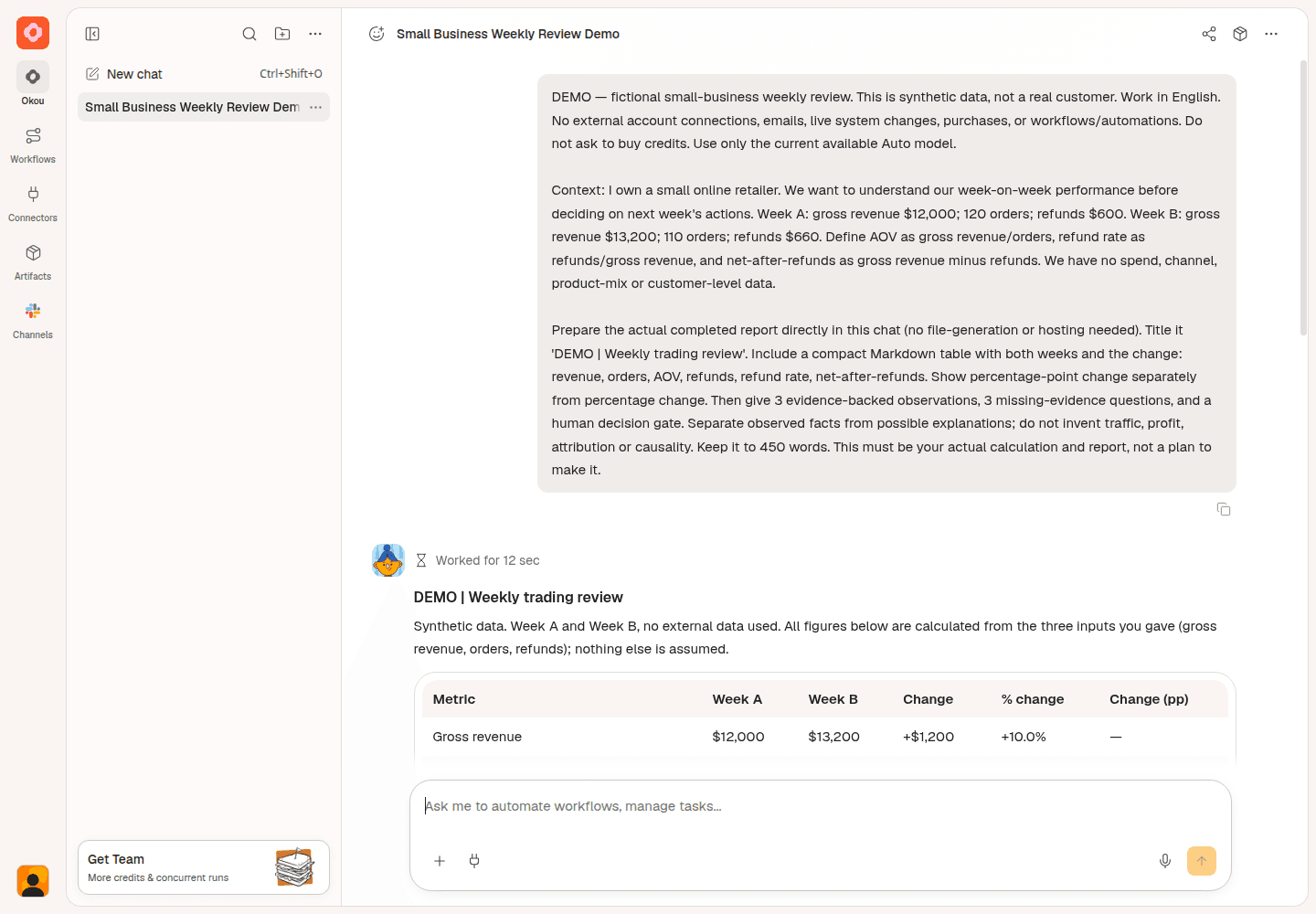
Figure 1. The actual submitted DEMO request, not an unsent composer. Source: this article's own Okou staging session, captured November 23, 2026. Complete 1440 × 1000 viewport; no crop, masking, compositing or UI content alteration.
The completed report calculated AOV as $100 → $120, an unchanged 5% refund rate, and net-after-refunds of $11,400 → $12,540. We recalculated these figures. They follow the supplied definitions; net-after-refunds is not profit and does not explain why orders fell.
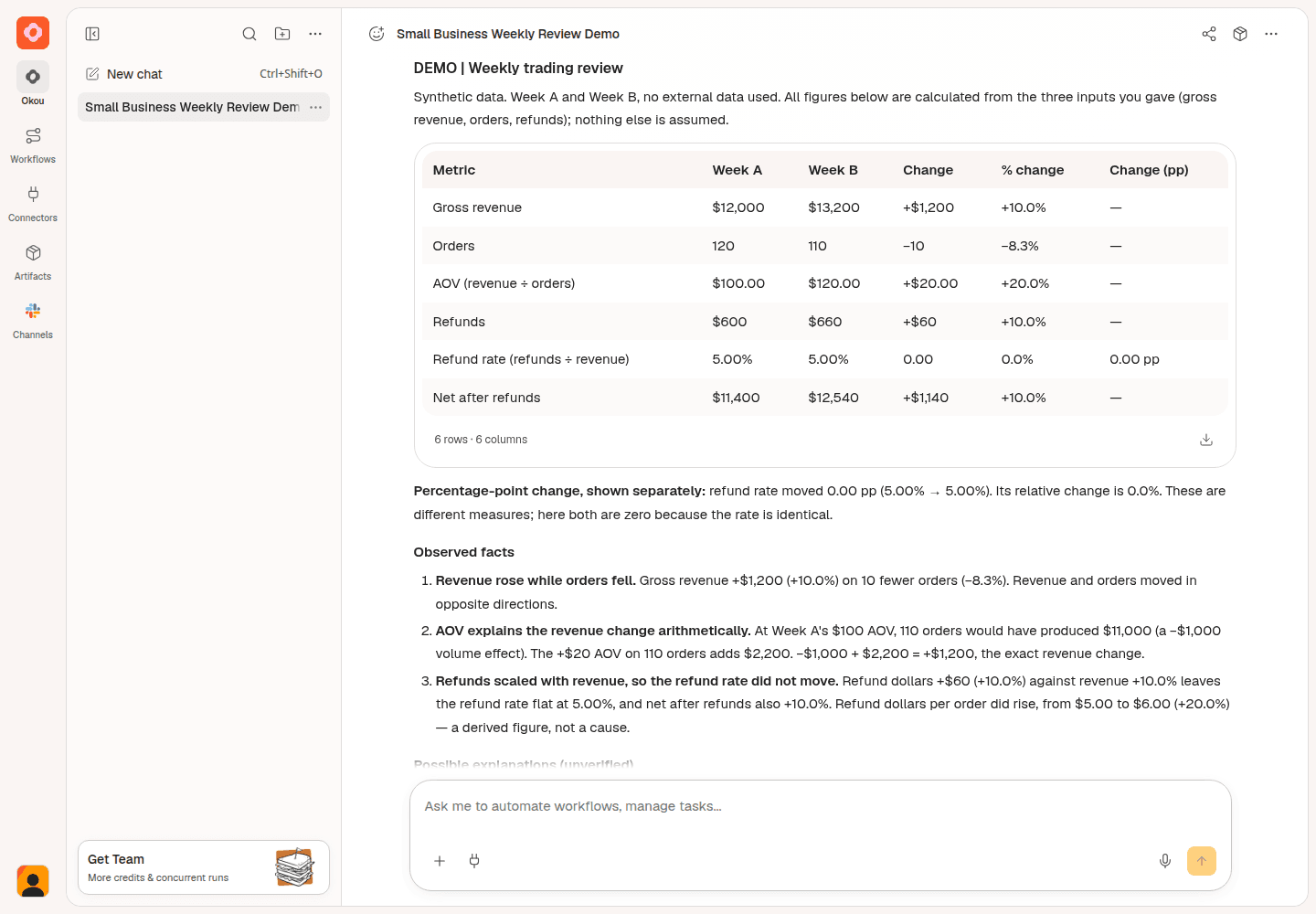
Figure 2. The completed report, with observed facts separated from causal explanations. This verifies the displayed calculations for this synthetic packet, not comparative accuracy or speed. Source: the same Okou staging session, captured November 23, 2026. Complete 1440 × 1000 viewport, including sidebar and composer.
In the same conversation, we added “no new ad spend or price changes” and requested public-source research. The resulting brief cited SBA's market-research guidance and Shopify's sales-report definitions. The product's usage breakdown also showed Data Search activity. The brief disclosed that the SBA article was retrieved through its legacy URL after the current path led to a hub page.
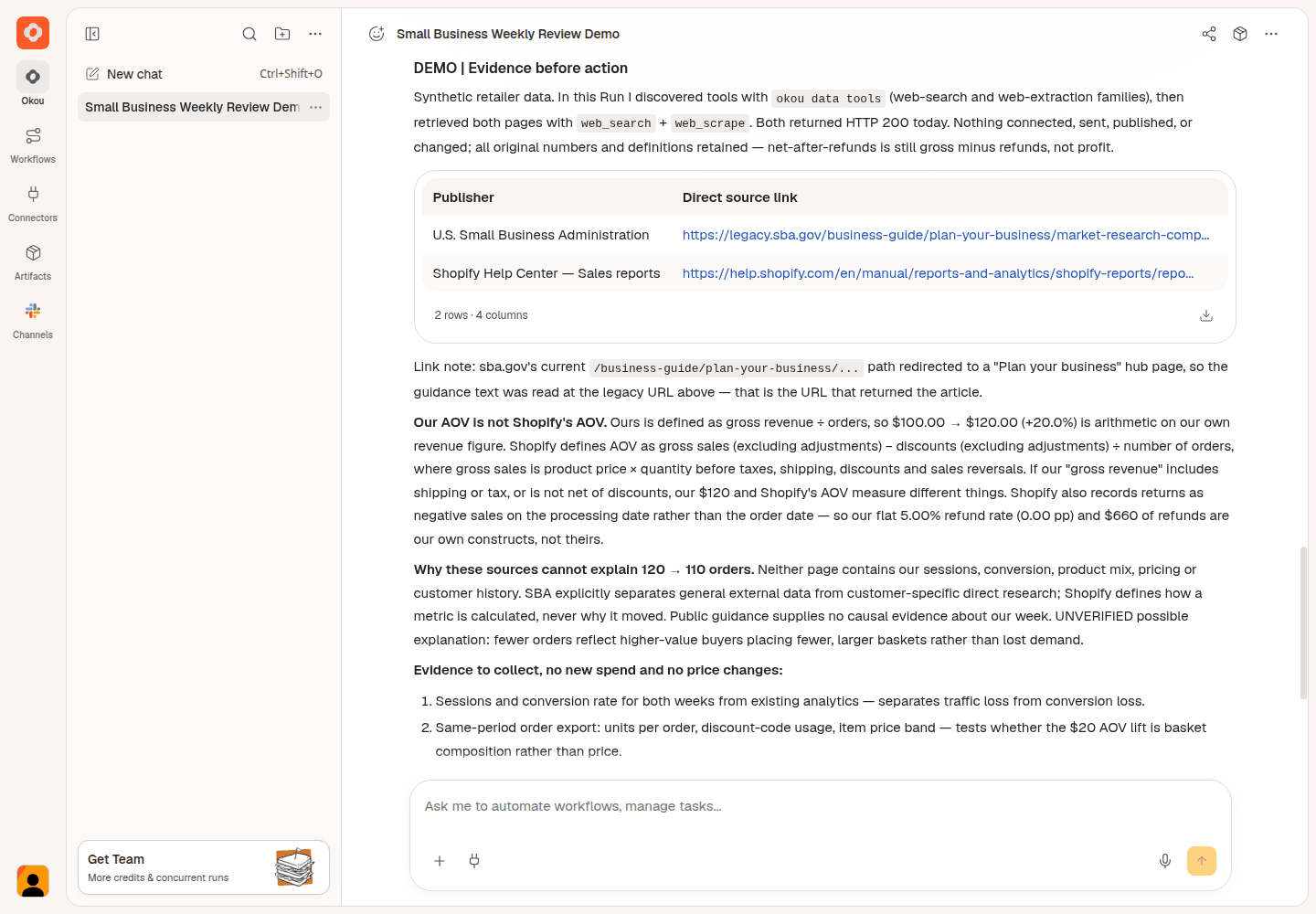
Figure 3. The actual research result and its evidence boundary. The source table scrolls horizontally in the product. The initial Shopify formula needed clearer parentheses in review: (gross sales excluding adjustments − discounts excluding adjustments) / orders. Source: the same Okou staging session, captured November 23, 2026. Complete 1440 × 1000 viewport, not a table-only crop.
We then restricted the next step to existing weekly aggregates: no customer-level or order-level exports. Review caught two issues: the hypothesis shorthand wrongly contrasted larger baskets with fewer small orders, and a subsequent draft assumed some unprovided metrics were available. We explicitly asked for corrections. The final note preserved the original figures and spending limits, marked missing inputs NOT PROVIDED, and left the decision with the owner.
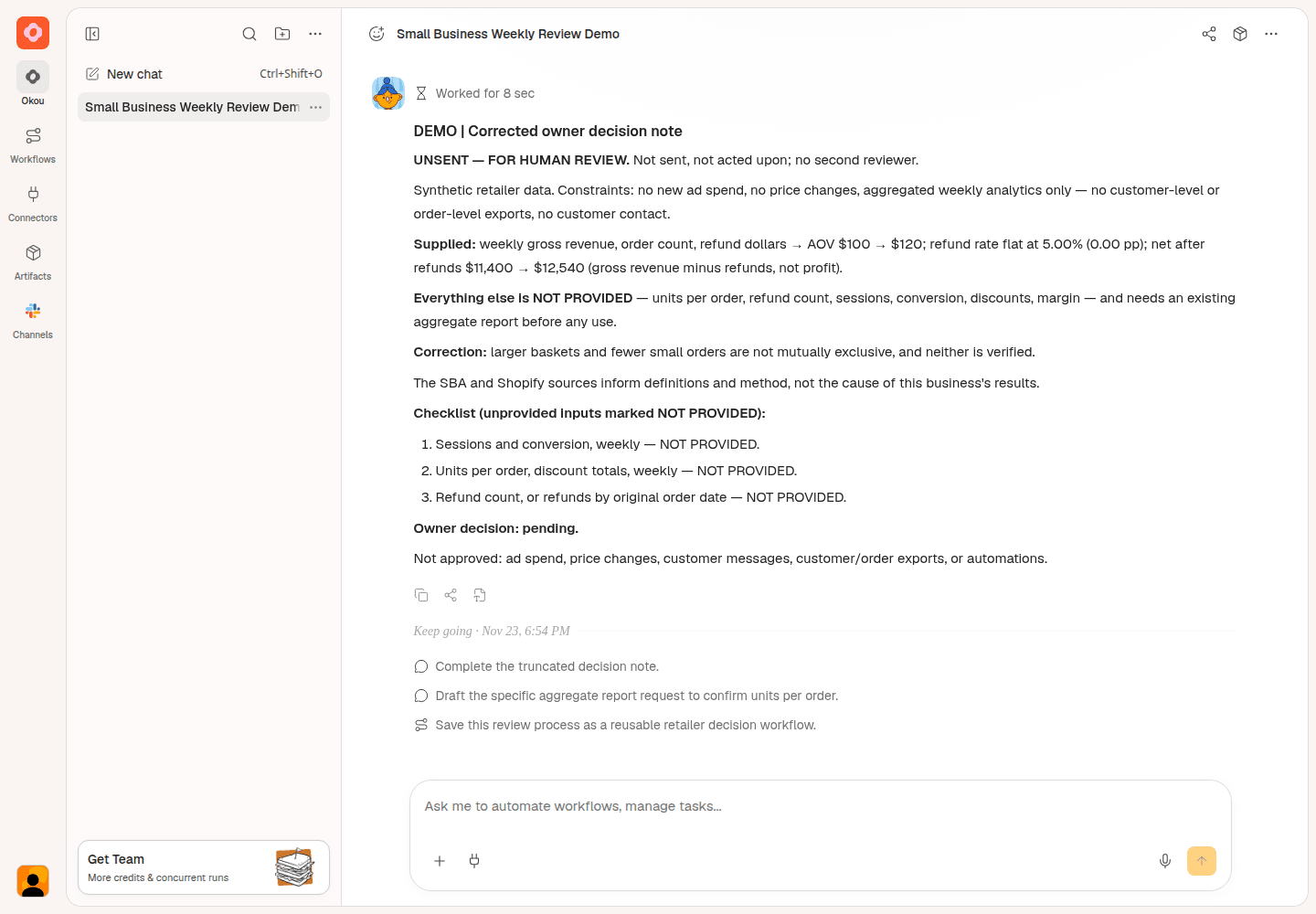
Figure 4. The corrected next-step handoff after directed follow-ups, not a first-pass result or an actual teammate's approval. It is explicitly UNSENT; no customer message, export, ad change, price change, or automation was executed. Source: the same Okou staging session, captured November 23, 2026. Complete 1440 × 1000 viewport with the task context and composer retained.
This is a concrete context-and-review example: a completed report, a source-linked research brief, and a revised decision note. It also shows why human review belongs in the workload estimate. We did not test a second user's access or approval, external writeback, or the other five assistants on this packet.
How to choose an AI assistant for your small business
Choose the assistant that finishes your recurring work with the least correction and an acceptable level of access. Start with the tools your team already uses, run the same small task packet through two candidates, and compare the remaining human work before buying a broader rollout.
Use a scorecard that exposes unfinished work
Don't reduce the trial to a single subjective star rating. Keep a short record for every task:
| Check | What to record |
|---|---|
| Facts | Unsupported claims, incorrect amounts, missing caveats, and source references |
| Delivery | Whether the requested file exists, opens, and can be edited or reviewed as required |
| Human effort | Time spent preparing inputs, answering clarification questions, and correcting the result |
| Control | Whether it respected draft-only instructions and asked before any prohibited action |
| Cost | Subscription requirements and any visible task, credit, or tool charges |
| Context continuity | Whether a follow-up preserves the earlier definitions, evidence, and action limits |
| Team review | Whether an authorized colleague can understand the evidence and review the next step without guessing |
Measure your manual baseline too. If preparing the assistant's inputs takes longer than doing the task yourself, that is part of the result.
A safety failure should stop the trial, not disappear into an average score. Sending a message against instructions or making up a customer promise isn't balanced out by a beautiful report.
Start with limited, low-risk access
Use anonymized exports before connecting live systems. Once the output is useful, test the required connection with the narrowest access available.
Check data handling for the plan you're buying, not just the brand name. Decide who can see the inputs and outputs, what retention rules apply, and who owns approval. Keep sensitive financial, employee, or customer data out of the trial until those questions have answers.
Frequently asked questions
What is the best AI assistant for a small business owner?
Start with the job that consumes the most repeat effort. ChatGPT and Claude are candidates for broad business work. Gemini and Microsoft 365 Copilot deserve an early look when your team already uses their office suites. Consider Lindy for connected inbox and follow-up work, and Okou for gathering evidence and preparing a next step in business context. A matched trial should decide between them.
Do I need a developer to use a business AI assistant?
You can test writing, document work, and file-based reports without writing code. Connected work still needs someone to authorize accounts, choose the correct data, and define exceptions. Ask the vendor to demonstrate your task with your required controls rather than accepting “no setup” as a complete answer.
Can one AI assistant replace all my small-business software?
Don't make that your buying assumption. Your CRM, accounting platform, and office suite may remain the systems of record. An assistant should help you work with those systems. A convincing chat response doesn't establish that a customer record, invoice, or booking has changed correctly.
How much should a small business budget for an AI assistant?
Compare the total cost of the workload you intend to run: required seats or plan upgrades, usage charges, and human review. Credits from different vendors aren't interchangeable units of work. Use the current vendor pricing pages and the observed cost of your trial instead of comparing credit counts alone.
Choose two tools, then give them the same job
Pick one task you expect to repeat next week. Set aside an anonymized input packet and write down what a usable result must contain. Run it through two candidates before you add another subscription.
If your bottleneck is gathering evidence and taking the next step in context, explore Okou. Give it the business brief, ask for a sourced recommendation, and follow up with a constraint that changes the decision. Keep actions draft-only until you and the relevant teammate have reviewed the evidence.
Sources and review date
Official product and plan sources reviewed November 23, 2026. Availability can vary by plan, account, region, and rollout. Some retrieved pages were served from the extraction provider's cache; recheck purchase-critical details before subscribing.
- OpenAI — ChatGPT overview: writing, search, Work, and deliverable formats.
- OpenAI — Business pricing and feature comparison: file analysis, research, scheduled tasks, workspace agents, and business data controls.
- Anthropic — Claude product overview: delegated tasks, document and artifact creation, connected work, and schedules.
- Google — Workspace AI: business use cases and Workspace data controls; separate Gemini Enterprise section.
- Google — Workspace pricing and plan comparison: edition-dependent AI access across Workspace apps.
- Microsoft — Copilot for business: work context, Office deliverables, multi-step work, and approval descriptions.
- Lindy — Product: connected work and recurring responsibilities.
- Lindy — Pricing: inbox and meeting functions, routines, approvals, active-user billing, and credits.
- Okou — Product: cross-functional work, team-wide context, research, and collaborative review.
- Okou — Pricing: plans, member packages, credits, delivery options, and per-member access controls.